
Benefits
Why Directory?
Key advantages of Directory as part of Navatom's integrated platform.
Complete Contact & Company Records in One Place
No more scattered spreadsheets, personal address books, or email signature hunting. Every contact and company your fleet works with lives in a single, searchable, always-current directory. Rich profiles with multiple emails, phone numbers, positions, and social media links ensure you always have the information you need.
73 Event Types for Full CRM Audit Trail
Every change to every contact and company is recorded across 73 event types with full user attribution and timestamps. ISM auditors, compliance officers, and management can trace the complete history of any directory record — who changed what, when, and why.
Deep Procurement & Vendor Integration
Supplier master data flows directly from the directory into procurement workflows. Purchase orders, requisitions, and quotations automatically carry the correct company details, financial settings, and contact information. No duplicate data entry, no stale vendor records.
Flexible Company Categorization with Custom Types
Organize your directory with color-coded company types and hierarchical categories tailored to your maritime operations. Visibility controls keep each module focused on relevant company types — procurement sees suppliers, crewing sees manning agencies, technical sees classification societies.
Scales from Single Vendor to Global Supply Chain
Whether you manage a handful of local suppliers or a global network of classification societies, flag states, port agents, and shipyards, the directory scales effortlessly. Server-side grids, secure company data isolation, and hierarchical structures handle any directory size.
Navatom Directory is a dual-entity CRM built for maritime fleet management — providing a unified, searchable directory of every contact and company your organization works with. From classification societies and flag state authorities to port agents, suppliers, charterers, and crew manning agencies, the Directory module replaces scattered spreadsheets, address books, and email signatures with a structured, always-current contact database that the entire shore office can rely on.
Built around two tightly integrated entity types — Contacts and Companies — the module captures rich profile data including multiple email addresses, phone numbers, social media accounts across five platforms (Facebook, Twitter, LinkedIn, Instagram, YouTube), and eleven employment types from full-time to seasonal. Multi-position job tracking lets a single contact hold roles at multiple companies with manager/subordinate hierarchy, while hierarchical company structures model departments, locations, and subsidiary/parent relationships.
Deep cross-module integration connects your directory to procurement, evaluation, and audit workflows. Financial settings track VAT/tax numbers, default currencies, and fiscal addresses per company.
A configurable company type and category system with color coding keeps your directory organized. With 73 event types across contacts and companies (31 + 42), every change is recorded in a complete, tamper-proof audit trail that supports regulatory compliance and internal governance.
Capabilities
Key Features
How Directory helps ship managers work faster and stay compliant.

Comprehensive Contact Management
Build rich contact profiles that capture every detail your maritime operations require. Each contact record stores multiple email addresses with default selection, multiple phone numbers with default designation, avatar photos, date of birth, preferred language, and free-form tagging for flexible categorization.
Contact profiles are not static address cards — they are living records that evolve with every interaction. Thirty-one event types track every change from creation and archival to email edits, phone number updates, position changes, tag modifications, and comment threads.
The result is a contact record that tells you not just who someone is, but the complete history of your relationship.
Company Directory
Maintain a comprehensive company database covering every organization your fleet interacts with — classification societies, flag state administrations, port agents, manning agencies, equipment suppliers, charterers, and more. Each company record holds logos, accreditations, department structures, multiple locations, and detailed contact information.
Company profiles support rich metadata including descriptions, industry classifications, and custom category hierarchies. Forty-two event types track every modification — from basic name changes and file attachments to department restructuring and subsidiary linking.
The company directory becomes your single source of truth for organizational knowledge across the fleet.
- Logo, accreditations & descriptions
- Department & location structures
- 42 company event types tracked
- Industry classification support
- Rich metadata per company

Eleven Employment Types
Capture the full spectrum of working arrangements in the maritime industry with eleven distinct employment types: Full-Time, Part-Time, Self-Employed, Contractor, Freelancer, Intern, Volunteer, Shift Worker, Apprenticeship, Seasonal, and Other. Each employment type accurately reflects the diverse workforce reality of ship management companies.
Whether you are tracking permanent shore staff, seasonal port workers, freelance marine surveyors, or apprentice cadets, the employment type system ensures every contact's working arrangement is properly classified. Employment types attach to positions, so a single contact can hold different employment types at different companies simultaneously.
- Full-Time, Part-Time, Contractor
- Freelancer, Self-Employed, Intern
- Shift Worker, Seasonal, Apprenticeship
- Volunteer & Other categories
- Per-position employment type assignment

Multi-Position Job Tracking
A single contact can hold positions at multiple companies simultaneously — reflecting the reality of maritime professionals who serve as consultants, board members, or contractors across several organizations. Each position records the company, job title, department, location type (On-Site, Remote, or Hybrid), and employment type.
The position system supports manager/subordinate hierarchy, letting you model reporting relationships within and across companies. Set a primary position to identify the contact's main affiliation.
Position changes are tracked as discrete events (add, edit, remove, set primary), building a complete career history within your directory.
- Contacts hold positions at multiple companies
- Manager/subordinate hierarchy
- Primary position designation
- On-Site, Remote & Hybrid location types
- Complete position change history

Department & Location Management
Model the internal structure of any company with dedicated department and location entities. Departments capture organizational divisions — Technical, Operations, Crewing, Commercial, HSQE — while locations store physical addresses for head offices, branch offices, warehouses, and port facilities.
Departments and locations link to the parent company and to individual contact positions, creating a three-dimensional organizational map. When you look up a contact, you see not just which company they work for, but which department and which office.
This structural detail is essential for routing communications, procurement approvals, and audit correspondence to the right people.
- Organizational department modeling
- Multiple physical location addresses
- Department-to-contact linking
- Three-dimensional organizational map

Subsidiary & Parent Company Relationships
Model complex corporate hierarchies with subsidiary and parent company relationships. A parent company can have multiple subsidiaries, and the directory visualizes these relationships as a navigable tree structure.
This is critical in the maritime industry where a single shipping group may operate through dozens of subsidiary management companies, each responsible for different vessel segments.
Hierarchical company structures ensure that when you search for a contact or company, you understand the full corporate context. Subsidiary relationships also support consolidated reporting — view all contacts, procurement history, and evaluations across an entire corporate group, not just a single entity.
- Navigable corporate hierarchy tree
- Multiple subsidiaries per parent
- Group-wide consolidated views
- Essential for multi-entity shipping groups

Five Social Media Integrations
Link social media profiles across five platforms — Facebook, Twitter, LinkedIn, Instagram, and YouTube — directly to company records. Social media links provide quick access to a company's public presence, marketing channels, and professional network profiles without leaving the directory.
In an industry increasingly using LinkedIn for professional networking and YouTube for fleet showcases, social media integration keeps your directory connected to the digital identity of every organization you work with. Each platform link is stored as a typed entry, making it easy to find and open the right profile.
- Facebook, Twitter, LinkedIn
- Instagram & YouTube profiles
- Typed platform-specific links
- Quick access from company profile

Financial Settings & Tax Management
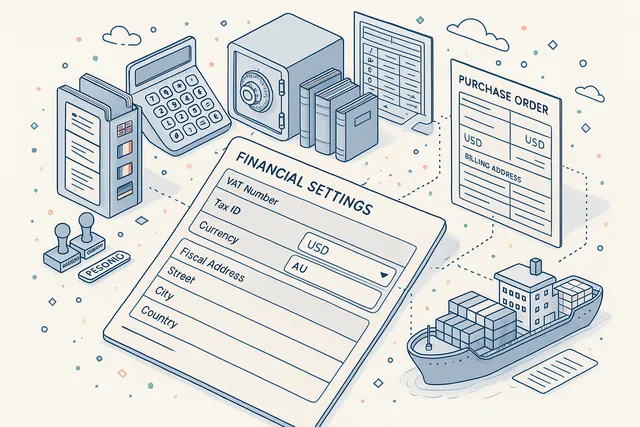
Store essential financial and tax information for every company — VAT numbers, tax identification numbers, default currency, and designated fiscal addresses. These financial settings integrate directly with procurement and invoicing workflows, ensuring that purchase orders, quotation requests, and payment documentation carry the correct fiscal data.
For multinational maritime operations dealing with suppliers and authorities across different tax jurisdictions, centralized financial settings eliminate the risk of incorrect VAT numbers on purchase orders or wrong currencies on quotations. The fiscal address field supports cases where a company's billing address differs from its operational locations.
- VAT & tax identification numbers
- Default currency per company
- Fiscal address for billing
- Direct procurement integration
- Multi-jurisdiction support
Company Type & Category System
Organize your company directory with a configurable type and category system. Company types — such as Classification Society, Flag State, Port Agent, Supplier, Charterer, Manning Agency — are fully customizable with color coding for visual identification in lists and grids. Categories add a second organizational dimension for industry-specific groupings.
The type system includes visibility controls that determine which company types appear in different module contexts. Suggested visibility rules let administrators pre-configure which types are relevant for procurement, crewing, technical management, and other workflows — keeping each module's company picker focused and uncluttered.
- Fully customizable company types
- Color coding for visual identification
- Per-module visibility controls
- Hierarchical category system
- Suggested visibility defaults

Procurement Integration
The Directory module serves as the supplier master data source for Navatom's procurement workflows. Every company marked as a supplier type carries its full profile — financial settings, contact persons, accreditations, and evaluation scores — into purchase order creation, requisition processing, and quotation management.
View a company's complete procurement history directly from its directory profile: purchase orders issued, requisition lists, delivery performance, and outstanding balances. This bidirectional integration means procurement teams never work with disconnected vendor data — every supplier interaction references the same authoritative company record.
- Supplier master data source
- Financial settings flow to POs
- Procurement history per company
- Requisition & quotation integration
- Bidirectional data linkage

Evaluation & Performance Scoring
Attach evaluation models to company records for structured performance scoring. Evaluation criteria can be customized per company type — rate suppliers on delivery reliability, quality, and pricing; rate classification societies on responsiveness and survey scheduling; rate manning agencies on crew quality and documentation turnaround.
Evaluation scores accumulate over time, building a quantitative performance history that supports data-driven vendor selection and relationship management. Scores are visible from the company profile and can be compared across companies of the same type, giving fleet managers objective metrics for procurement decisions and contract renewals.
- Customizable evaluation models
- Per-company-type scoring criteria
- Quantitative performance history
- Cross-company score comparison
- Data-driven vendor selection

Comments, Attachments & File Management
Add threaded comments and file attachments to any contact or company record. Comments create a permanent communication log — record meeting notes, phone call summaries, negotiation updates, and relationship context directly on the entity they relate to. Every comment action (add, edit, delete) is tracked in the audit trail.
File management supports uploading, editing, and removing attachments such as certificates, contracts, accreditation documents, and correspondence. Avatar and logo uploads give contacts and companies a visual identity in lists and detail views. All file operations are recorded as discrete events in the audit trail.
- Threaded comments per entity
- File upload, edit & removal
- Avatar & logo management
- Certificates & contract storage
- Full event logging per action

Tag-Based Categorization
Apply flexible tags to both contacts and companies for cross-cutting categorization that goes beyond the structured type and category system. Tags support ad-hoc groupings — mark contacts as "Key Decision Maker", "Technical Expert", or "Emergency Contact"; tag companies as "Preferred Vendor", "Under Review", or "New Partnership".
Tags can be added, removed, and bulk-edited with full event tracking. Use tags to create dynamic filtered views of your directory — find all emergency contacts across all port agent companies, or list every preferred vendor tagged for a specific equipment category. Tags are lightweight, user-defined, and unlimited in number.
- Flexible tags for contacts & companies
- Ad-hoc cross-cutting groupings
- Add, remove & bulk-edit with tracking
- Dynamic filtered directory views

Settings & Visibility Control
Administrators configure company type definitions, visibility rules, and suggested visibilities through a dedicated settings interface. Visibility controls determine which company types appear in module-specific contexts — a procurement module sees suppliers and vendors, while a crewing module sees manning agencies and training centers.
Suggested visibility rules let administrators pre-set sensible defaults that can be overridden per user or role. The settings system also manages the category hierarchy, color assignments for company types, and default behavior for new company creation. Centralized configuration ensures directory consistency across your entire organization.
- Company type definition management
- Module-specific visibility rules
- Category hierarchy configuration
- Color & default behavior settings

Complete Audit Trail
Every action within the Directory module is recorded in a granular event log spanning 73 event types — 31 for contacts and 42 for companies. Contact events track creation, deletion, archival, attachment changes, avatar uploads, company binding, birth date updates, comment threads, email and phone number management, name edits, position changes, language preferences, and tag modifications.
Company events cover an even broader scope including activation/deactivation, department and location changes, financial setting updates, logo management, subsidiary linking, and social media account changes. Each event carries full user attribution, timestamp, and contextual data.
The combined audit trail provides a second-by-second history of every CRM change, fully auditable for ISM compliance and internal governance.
- 31 contact event types
- 42 company event types
- 73 total CRM events tracked
- Full user attribution per event
- ISM-compliant audit evidence

FAQ
Frequently Asked Questions
Common questions about Directory answered.
What information can be stored for contacts and companies?+
Contacts store multiple email addresses, phone numbers, avatar photos, date of birth, preferred language, tags, positions (with company, department, job title, employment type, and location type), and threaded comments with file attachments. Companies store logos, descriptions, accreditations, departments, locations, subsidiary/parent relationships, social media accounts (Facebook, Twitter, LinkedIn, Instagram, YouTube), financial settings (VAT/tax numbers, currency, fiscal address), custom types with color coding, categories, tags, comments, and file attachments.
How does the company type system work?+
Company types are fully customizable — administrators create types like Classification Society, Flag State, Port Agent, Supplier, Charterer, or Manning Agency. Each type has a color code for visual identification in lists and grids.
Visibility rules control which types appear in different module contexts, and suggested visibilities provide sensible defaults. Categories add a second organizational layer for industry-specific groupings.
Can a contact work at multiple companies?+
Yes. The multi-position system lets a single contact hold positions at multiple companies simultaneously.
), location type (On-Site, Remote, Hybrid), and manager/subordinate hierarchy. One position is designated as the primary affiliation.
How does the directory integrate with procurement?+
Companies marked as supplier types serve as the master data source for procurement workflows. Their financial settings, contact persons, accreditations, and evaluation scores flow directly into purchase order creation, requisition processing, and quotation management.
You can view a company's complete procurement history from its directory profile.
Can we track company subsidiaries and parent organizations?+
Yes. The directory supports subsidiary/parent company relationships modeled as a navigable tree structure.
A parent company can have multiple subsidiaries, and you can view the complete corporate hierarchy from any entity in the tree. This is essential for maritime groups operating through multiple subsidiary management companies.
Is there an audit trail for CRM changes?+
Every action is recorded across 73 event types — 31 for contacts (covering creation, archival, email/phone changes, position updates, tag modifications, comments, attachments, and more) and 42 for companies (covering activation/deactivation, department changes, financial updates, subsidiary linking, social media accounts, and more). Each event carries full user attribution, timestamp, and contextual data for ISM compliance.
Related Modules
Streamline purchasing workflows from requisition to delivery with supplier integration.
Handle technical enquiries and communication between office and vessel with full traceability.
Ready to try Directory?
Start your free trial today and see how Directory fits into your fleet operations.
Free Trial
No credit card required
30+ Modules
Fully integrated platform
Cloud-Based
No installation needed