
Benefits
Why Drydock?
Key advantages of Drydock as part of Navatom's integrated platform.
Every Drydock Item Tracked from Plan to Invoice
From the moment a drydock is scheduled through task specification, work execution, cost capture, and final report sign-off, Navatom Drydock maintains one continuous record. Estimated costs are captured at task creation, actual costs at completion, PO numbers at invoicing — the complete financial lifecycle of every work item is traceable without switching systems or reconciling separate spreadsheets.
Cross-Module Visibility Without Duplicate Entry
Postponed PMS maintenance items, deferred deficiencies, non-conformities, technical findings, and enquiries auto-surface as drydock tasks the moment they are deferred in their originating modules. The work scope assembles itself from operational data. Date changes cascade back to source modules automatically. No manual re-entry, no forgotten items, no date drift between systems.
Fleet-Wide Calendar Integration
Every drydock event appears on the shared fleet calendar automatically. Date changes propagate instantly. Filtered calendar views show only docking events across the fleet. Fleet planners always know when vessels will be out of service without cross-referencing separate scheduling spreadsheets or emailing superintendents for updates.
Controlled Cost Tracking with Expenditure Integration
Estimated and actual costs tracked per task with multi-currency support, sequential PO numbers generated atomically for invoicing, and a dedicated dashboard widget that flags completed tasks without linked expenditures. Financial reconciliation becomes a systematic process, not a manual chase through paper trails after the vessel leaves the yard.
Printable Drydock Reports for Yard Coordination
The PDF export produces a structured drydock specification document organized by task type for yard handover. Each task includes its title, category, description, cost estimates, and subcontractor assignment. The yard receives one authoritative document covering the complete work scope — eliminating back-and-forth emails and fragmented specification files.
Navatom Drydock is the end-to-end drydock project management module for maritime fleet management — covering every stage from initial scheduling through task specification, yard coordination, cost tracking, and final report to completion. It replaces fragmented spreadsheet-based docking specifications, disconnected vendor communications, and informal task lists with a controlled, cloud-synchronized drydock management platform that gives your technical superintendent, fleet manager, and shore team a single authoritative record for every docking event.
Scheduled drydocks automatically create fleet calendar events, generate sequential project IDs incorporating vessel, year, and sequence number, and accept postponed items from PMS, Deficiency, and Enquiry modules so the work scope is assembled automatically — not manually re-entered.
Built around a four-status lifecycle (Scheduled, Started, Finished, Deprecated), a seven-type task system covering every work source from manual specification to cross-module deferrals, and a 14-category task classification spanning Drydocking through Engine through Accommodation, Navatom Drydock adapts to the full complexity of a major docking event. Each task carries its own estimated and actual cost, subcontractor details, sequential PO number in PO-YYYY-SN-seq format, and a two-field rich-text record — Details and Report stored independently in the cloud.
Three-panel detail views for both the drydock project and individual tasks give superintendents navigable access to the full scope, the complete cost picture, the final narrative report, and the event audit trail from a single screen.
With 47 auditable event types capturing every state transition and field change at both drydock and task level, five dashboard widgets providing fleet-wide manager KPIs, direct CRM integration for shipyard company management, a predefined task library for reusable specification templates, and a formatted PDF export that splits tasks into four type-based groups for yard handover, Navatom Drydock is purpose-built for the scale, coordination complexity, and cost accountability requirements of professional ship management.
Capabilities
Key Features
How Drydock helps ship managers work faster and stay compliant.

Drydock Scheduling & Lifecycle Management
Every drydock starts with a scheduling action that creates the project record, assigns it a sequential identifier incorporating vessel, year, and sequence number, and simultaneously creates a calendar event with drydock-type so the event appears on the fleet-wide shared calendar. Two types are available: Scheduled (planned dockings with advance notice) and Unscheduled (emergency dockings that arise without advance planning).
The lifecycle follows a linear four-status path — Scheduled, Started, Finished, Deprecated — with Deprecated used for cancelled events without losing the record. A single inbox notification with VeryHigh priority fires when a drydock is completed, ensuring stakeholders are immediately informed.
Date fields distinguish between the scheduled date (planned), the estimated date (current working estimate), and the actual started date. Editing a scheduled drydock's date deletes and recreates the calendar event via the calendar integration — the calendar always reflects the current committed date, not the original plan.
Deleting a scheduled drydock removes both the calendar event and its metadata, leaving no orphaned records in the calendar system. The inline-editable title, shipyard assignment, and office assignee fields are all patchable after creation through eight dedicated field update modes in the update modes.
7-Type Task Management System
Every piece of work performed during a docking event is recorded as a drydock task. Seven task types cover every source: Maintenance (deferred PMS items), Deficiency (open deficiency records), Non-Conformity (non-conformity records), Technical Finding (technical findings from audits), Predefined (reusable specification items from the predefined task library), Enquiry (deferred enquiry items), and Other (manually specified ad-hoc work).
Each type carries its own status lifecycle: Not Started, Started, Completed, and optionally Deleted for administrative removal.
Tasks created from cross-module postponements automatically link back to the originating record — the drydock task carries the source module's document ID and type, creating a bidirectional traceability chain. Manually adding a task requires only a title and category; the system assigns a unique identifier, sets the initial status to Not Started, and emits a task creation event.
Bulk task insertion from predefined templates uses batch write operations for guaranteed consistency — all-or-nothing insertion of an entire specification set.
- Maintenance, Deficiency, Non-Conformity, Technical Finding, Predefined, Enquiry, Other
- Not Started → Started → Completed task status machine
- Bidirectional link to originating module record
- Bulk insertion from predefined task library (batch write)
- Cross-module postponement creates tasks automatically

14-Category Task Classification
Every drydock task is classified into one of 14 categories that represent the major work areas of a docking event: Drydocking, Hull, Tank, Deck, Cargo, Engine, Auxiliary Machinery, Electrical, Piping, Safety Equipment, Navigation, Communication, Accommodation, and Other. This classification drives both the task organization within the drydock record and the four-group PDF export that separates tasks by type for yard handover.
Categories are assigned at task creation and can be changed throughout the task lifecycle. The category classification is independent of the task type — a Maintenance task, a Deficiency task, and a Predefined task can all carry the same category.
Fleet-wide analytics can aggregate drydock work by category across multiple docking events to reveal patterns in where the most effort, cost, and delays concentrate.
- Drydocking, Hull, Tank, Deck, Cargo, Engine, Auxiliary Machinery
- Electrical, Piping, Safety Equipment, Navigation, Communication
- Accommodation, Other — 14 categories total
- Drives PDF export grouping and fleet-wide analytics
- Independent of task type — any source gets any category

Predefined Task Library
The Predefined Task Library provides a reusable template system for standard drydock specification items. Technical superintendents create predefined task templates with a title, description, and category.
These templates are stored at the company level and are available for selection when adding tasks to any drydock project across the fleet.
When adding predefined tasks, the user selects from the library and the system creates full drydock task records by copying the template data. The bulk insertion operation uses a batch write to insert all selected tasks and their corresponding event records in a single database round trip.
This eliminates the need to manually re-enter standard work items for each docking event, and ensures that the standard docking specification is applied consistently across sister ships.
- Company-level reusable task templates
- Title, description, and category per template
- Bulk add to any drydock project across the fleet
- Batch write for guaranteed multi-task insertion
- Standard docking spec applied consistently across sister ships

Dual Rich-Text Documentation
Every drydock task carries two independent rich-text fields with full formatting support: Details (the pre-work scope specification describing what needs to be done) and Report (the post-work completion narrative describing what was actually done). Both fields are stored as separate cloud storage objects with a field-level discriminator in the cloud storage key — neither field can overwrite the other.
Content-based deduplication prevents redundant cloud writes when predefined task content is copied across multiple tasks.
At the drydock project level, a third independent rich-text field — the Final Report — provides a single narrative document summarizing the entire docking event. The three-tier documentation structure (task details, task reports, project final report) gives superintendents a clean separation between planning documentation, execution records, and the summary narrative that accompanies the project closure.
- Rich-text Details field (pre-work scope specification)
- Rich-text Report field (post-work completion narrative)
- Drydock-level Final Report for project summary
- All three fields stored as independent cloud objects
- Content-based deduplication prevents redundant writes

Task Cost & Expenditure Tracking
Every drydock task carries two cost fields: estimated cost (the budget figure captured at specification time) and actual cost (the real expenditure captured at completion). Both fields support currency codes for multi-currency tracking across international shipyard engagements.
A subcontractor name and reference field on each task records the responsible yard vendor for the work item.
Expenditure records created from drydock task invoicing receive a sequential PO number via a guaranteed unique sequence counter. The format uses the current year, the vessel identifier, and a per-year-per-vessel counter that increments without gaps or collisions.
The 5-Widget Dashboard Suite includes a dedicated widget that surfaces completed tasks with no linked invoice — serving as a post-docking financial reconciliation checklist to ensure no work item escapes the cost record.
- Estimated cost and actual cost per task with currency codes
- Subcontractor name and reference fields
- Sequential PO number with guaranteed unique counter
- Dashboard widget flags completed tasks with no invoice
- Multi-currency support for international yard engagements

Cross-Module Postponement Aggregation
When items in other modules are deferred to a drydock period, they automatically surface as tasks in the drydock record. Postponed PMS maintenance logs with DryDock postponement type, deferred Deficiency records, deferred Non-Conformity records, deferred Technical Finding records, and deferred Enquiry records all create corresponding drydock task entries with the appropriate task type and a bidirectional reference to the originating record.
Date change operations on a drydock's scheduled or estimated date trigger a cascade that propagates the new date to every linked postponed item across all five source modules. The cascade is executed server-side as a coordinated update across all linked records within the same request, ensuring consistency across all originating modules without client-side coordination.
This means the drydock work scope assembles itself from operational data — no manual re-entry of deferred items, and no risk of date drift between the drydock plan and the originating module records.
- PMS, Deficiency, Non-Conformity, Technical Finding, Enquiry postponements
- Auto-created drydock task with bidirectional link
- Date change cascades to all linked source module records
- Server-side coordinated update in single request
- Work scope assembles itself from operational data

CRM Shipyard Integration
Every drydock record can be linked to a shipyard company managed through Navatom's CRM module. The shipyard field references a CRM company record, providing the yard's full contact details, location, and historical engagement record directly from the drydock project view without maintaining a separate vendor list.
This integration means that when a drydock is scheduled, the superintendent assigns a shipyard from the company's existing CRM database rather than typing a free-text name. Fleet-wide analytics can aggregate drydock history by shipyard, revealing which yards handle the most projects, which yard relationships deliver the best cost outcomes, and which yards have the deepest experience with specific vessel types.
- Shipyard field references CRM company record
- Full contact details from CRM without separate vendor list
- Fleet-wide drydock history aggregated by shipyard
- Yard performance and cost analysis across docking events

Calendar Integration
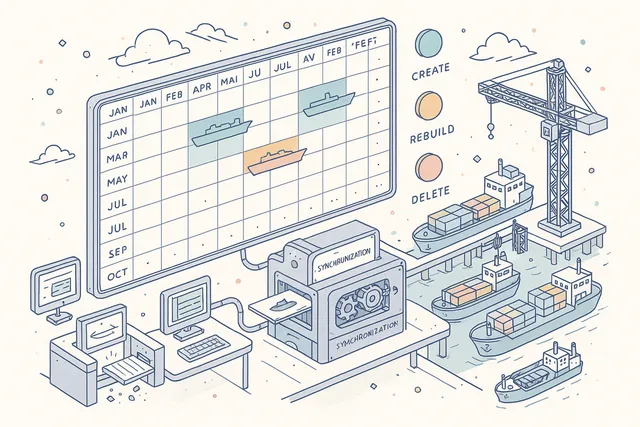
The calendar integration engine manages a three-operation lifecycle: CREATE (on drydock scheduling — inserts a calendar event with metadata), REBUILD (on date edit — deletes existing event and creates a fresh record with updated dates), and DELETE (on drydock deletion — removes both the calendar event and its metadata). Every drydock appears on the fleet-wide shared calendar alongside other module events such as audits and surveys.
The calendar event carries the drydock's drydock-type identifier, enabling filtered calendar views that show only docking events. Calendar integration is fully automatic — no manual calendar entry is needed, and date changes propagate instantly.
This ensures that fleet planners always have an accurate picture of when vessels will be out of service for docking, without cross-referencing separate scheduling spreadsheets.
- Calendar engine: CREATE, REBUILD, DELETE lifecycle
- Calendar event with metadata for each drydock
- Date edits auto-rebuild the calendar event
- Deletion removes both event and metadata — no orphans
- Filtered calendar views for docking events only
Three-Panel Drydock Detail View
The drydock detail view provides a three-panel layout that gives superintendents complete project visibility from a single screen. The west sidebar contains the definition fields — project ID, type (Scheduled/Unscheduled), status, three date fields (scheduled date, estimated date, started date, finished date), all inline-editable for authorized users, plus the Assignees panel listing office team members assigned to the project.
The panel title is directly editable inline without navigating to a separate edit form.
The center panel provides six tabs covering the full project scope: Tasks (all tasks with type indicators and status), Maintenance (filtered to Maintenance tasks only), Issues (filtered to Deficiency/Non-Conformity/Technical Finding types), Enquiries (filtered to Enquiry tasks), Report (the Final Report editor), and Invoices (the expenditure table linked to all tasks). The east dock panel provides Comments (threaded project-level conversation), Attachments (drydock-level file evidence), and Events (the real-time 22-event drydock-level audit log).
This three-panel architecture gives superintendents everything — scope, cost, narrative, and audit trail — without navigating away from the project record.
- West: definition fields, dates, assignees (inline-editable)
- Center: Tasks, Maintenance, Issues, Enquiries, Report, Invoices tabs
- East dock: Comments, Attachments, Events (22-event log)
- Six-tab center panel covers full project scope
- Superintendent sees scope, cost, narrative, and audit from one screen

Three-Panel Task Detail View
The task detail view mirrors the drydock detail view's three-panel structure adapted for individual work items. The west sidebar contains two sections: Information (category, scheduled dates, task status, type badge showing which source module the task originated from) and Expenditures (estimated cost, actual cost with currency codes, subcontractor name and reference), plus the Assignments panel showing ship-side and office-side assignees separately.
Start Task and Complete Task action buttons are prominently placed, with the task status lifecycle enforcing the Not Started → Started → Completed transition sequence.
The center panel provides three tabs: Description (the Details editor for pre-work scope specification), Report (the completion Report editor for post-work narrative), and Invoices (the PO-linked expenditure records for this task). The east dock panel provides the same Comments, Attachments, and Events tabs as the parent drydock view, but scoped to the task level and drawing from the 25-event task-level event type set.
This separation between the task's east dock and the parent drydock's east dock ensures that task-specific comments and attachments are organized independently from the project-wide collaborative record.
- West: Information, Expenditures, Assignments panels
- Center: Description, Report, Invoices tabs
- East dock: Comments, Attachments, Events (25-event log)
- Start Task and Complete Task actions with status enforcement
- Ship-side and office-side assignees shown separately

47-Event Audit Trail
Every action on a drydock project or its tasks is recorded as an immutable event in a tamper-proof log. The system defines 22 drydock-level event types covering: creation, type change, status transitions (schedule, start, complete, delete/deprecate), and individual field updates for title, start date, scheduled date, estimated date, shipyard, final report content, type, and office assignees.
Additionally, comment operations (create, edit, delete) and attachment operations (add, edit, remove) are each their own distinct event type at the drydock level, producing a second-by-second narrative of every modification to the project record.
The task-level event log adds 25 more event types covering task creation, status transitions (start, complete), category change, date changes, estimated cost, actual cost, subcontractor updates, ship and office assignee changes, description content changes, report content changes, and the same comment and attachment operation events scoped to the task. This 47-event total across both levels means that the complete drydock event history — from scheduling the project through closing the final task invoice — is preserved as a tamper-evident, immutable record available for class society inspection, internal compliance review, and contract dispute resolution.
- 22 drydock-level event types (creation, status, field updates, comments, attachments)
- 25 task-level event types (creation, status, cost, assignees, content, comments)
- Tamper-proof, immutable — no events can be modified or deleted
- Available in east dock Events tab on both detail views
- Tamper-evident record for class society and compliance inspection

5-Widget Dashboard Suite
Navatom Drydock provides five dedicated dashboard widgets that give fleet managers and technical superintendents real-time visibility into docking project status without navigating into individual drydock records. The first widget — My Active Drydocks — renders as both a count (active drydocks assigned to the current user) and a detailed table (the underlying list with status, vessel, and shipyard).
The second and third widgets — My Open Tasks and My Open Issues — show the user's open task backlog and issue-type tasks respectively.
The fourth widget — My Maintenance Tasks — surfaces maintenance-type tasks specifically, giving technical superintendents a dedicated view of PMS-deferred work awaiting action in active dockings. The fifth widget — Completed Without Invoice — identifies completed tasks that have not yet been linked to an expenditure record, serving as a post-docking financial reconciliation tool.
All five widgets are configurable for dashboard placement alongside other module KPI widgets.
- My Active Drydocks: count + detailed table
- My Open Tasks: open task backlog
- My Open Issues: issue-type tasks
- My Maintenance Tasks: PMS-deferred work
- CompletedNoInvoice: financial reconciliation widget

Drydock Print & PDF Export
The drydock module includes a formatted PDF export that generates a formatted drydock specification document for yard handover. The export organizes tasks into four type-based groups — standard work items, maintenance-deferred items, issue-deferred items, and enquiry-deferred items — giving the yard a structured view of the complete work scope organized by origin.
Each task in the export includes its title, category, description, status, cost estimates, and subcontractor assignment. The document header carries the drydock project identifier, vessel name, shipyard, scheduled dates, and assigned superintendent.
This print-ready format eliminates the need to manually compile docking specifications from separate systems and ensures the yard receives a complete, authoritative work scope document.
- Formatted PDF generation for yard handover
- Four type-based task groups: standard, maintenance, issues, enquiries
- Header: project ID, vessel, shipyard, dates, superintendent
- Per-task: title, category, description, cost, subcontractor
- Single authoritative document replaces fragmented spec files

FAQ
Frequently Asked Questions
Common questions about Drydock answered.
How does drydock scheduling integrate with the fleet calendar?+
When a drydock is scheduled, the system automatically creates a calendar event with drydock-type via the calendar integration engine. The event appears on the fleet-wide shared calendar alongside audit and survey events.
If the drydock's scheduled date is changed, the calendar event is automatically deleted and recreated with the new date — the calendar always reflects the current plan. Deleting a drydock removes both the calendar event and its metadata, leaving no orphaned records.
Two drydock types are supported: Scheduled (planned) and Unscheduled (emergency), both following the same calendar integration pattern.
How do postponed PMS, deficiency, and enquiry items appear in the drydock?+
When an item in any of five modules (PMS, Deficiency, Non-Conformity, Technical Finding, Enquiry) is deferred to a drydock period, the system automatically creates a drydock task with the corresponding task type and a bidirectional reference to the originating record. The drydock work scope assembles itself from operational data.
When the drydock's scheduled or estimated date changes, a server-side cascade propagates the new date to every linked postponed item across all five source modules in a single coordinated update, ensuring date consistency without manual coordination.
How are drydock task costs tracked and reconciled?+
Every drydock task carries two cost fields — estimated cost (budget) and actual cost (real expenditure) — with currency code support for multi-currency yard engagements. A subcontractor name and reference field records the responsible yard vendor.
Expenditure records receive sequential PO numbers via a guaranteed unique counter that prevents duplicate numbers under concurrent operations. The Completed Without Invoice dashboard widget flags completed tasks with no linked expenditure, providing a systematic post-docking financial reconciliation checklist.
What documentation is generated for yard handover?+
The PDF export generates a formatted drydock specification document organizing tasks into four type-based groups: standard work items, maintenance-deferred items, issue-deferred items, and enquiry-deferred items. Each task shows its title, category, description, status, cost estimates, and subcontractor assignment.
The document header includes the project identifier, vessel name, shipyard, dates, and assigned superintendent. Additionally, each task carries dual rich-text documentation — Details (pre-work scope) and Report (post-work narrative) — stored independently in the cloud.
What audit trail is available for class society inspection?+
The system defines 47 distinct event types — 22 at the drydock project level and 25 at the task level. Drydock-level events cover creation, type changes, all four status transitions, and individual field updates for title, dates, shipyard, final report, and assignees, plus comment and attachment operations.
Task-level events cover creation, status transitions, category changes, date and cost updates, assignee changes, content changes, and comment/attachment operations. All events are tamper-proof and immutable — no event can be modified or deleted after recording.
The complete history is available in the east dock Events tab on both drydock and task detail views.
Glossary
Related Maritime Terms
Key terms and concepts related to Drydock.
Related Modules
Monitor fuel consumption, waste management, and environmental compliance across the fleet.
Track and analyze vessel operating expenses with budget comparison and forecasting.
Schedule, track, and manage planned maintenance jobs across your fleet with real-time synchronization.
Ready to try Drydock?
Start your free trial today and see how Drydock fits into your fleet operations.
Free Trial
No credit card required
30+ Modules
Fully integrated platform
Cloud-Based
No installation needed